Playwright on the native process
First, log in to the server where API Maker is installed.
Make sure you’re logged in as the root user.
Run the command below to check whether you’re logged in as root:
If the output is not root, you need to switch to the root user.
Run the following command:
After that, run the command below:
This will install all the required browser and OS dependencies for Playwright.
Next, navigate to the project root folder:
Install Playwright as a dependency:
Now, from the API Maker dashboard, create a native custom API.
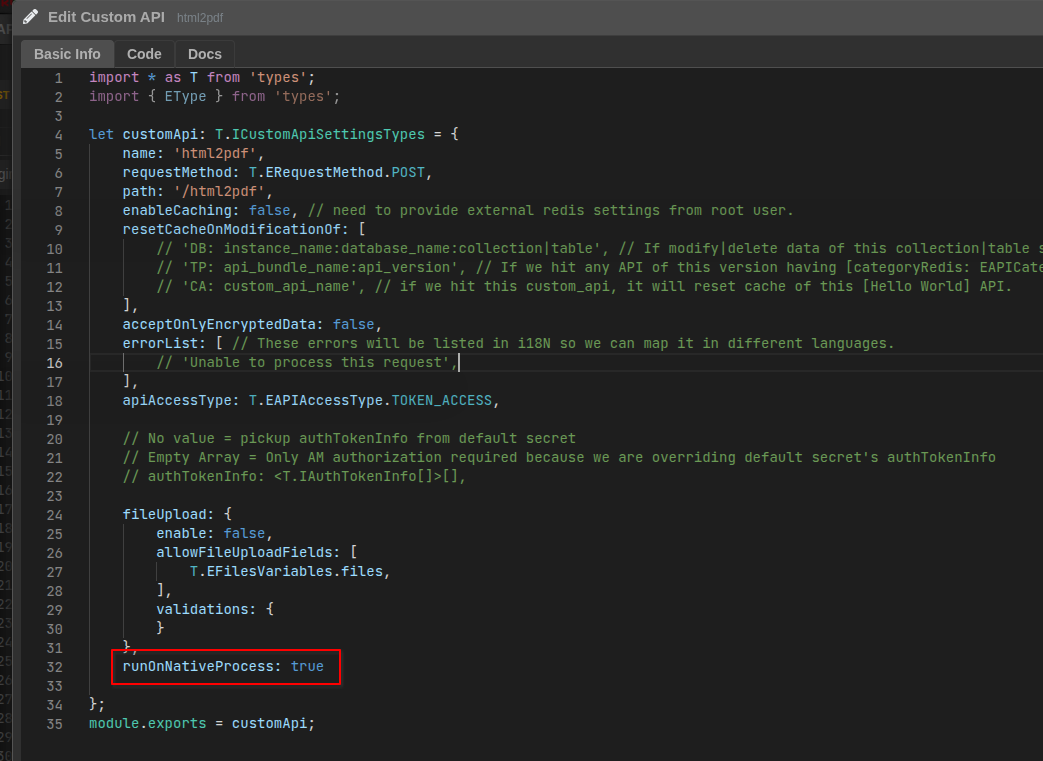
To run the custom API as a native process, enable it in the Custom API Schema under the Basic Info section by setting:
Below is the Image Reference -
Once the API is created, you can import Playwright directly into your API code:
At this point, Playwright is fully available in your code, and you can use it according to your requirements.
Below is a simple example that demonstrates how to generate a PDF from HTML using the Playwright library.
import * as T from 'types';
import { join } from 'path';
const playwright = require('playwright');

async function htmlToPdf() {
  const browser = await playwright.chromium.launch();
  const page = await browser.newPage();

  const filePath = join(__dirname, 'uploads', 'playwright.pdf');

  const html = `
    <!DOCTYPE html>
    <html>
      <head>
        <style>
          body {
            font-family: Arial, sans-serif;
            padding: 40px;
          }

          p {
            font-size: 18px;
            color: #333;
          }
        </style>
      </head>

      <body>
        <p>Hello from Playwright (ESM) 👋</p>
      </body>
    </html>
  `;

  await page.setContent(html, { waitUntil: 'load' });

  await page.pdf({
    path: filePath,
    format: 'A4',
    printBackground: true,
    margin: {
      top: '20mm',
      right: '20mm',
      bottom: '20mm',
      left: '20mm',
    },
  });

  await browser.close();

  // `filePath` contains the location of the generated PDF.
  // You can use this path to upload the file to a storage provider
  // or serve it for download.

}

async function main(g: T.IAMGlobal) {
  await htmlToPdf();
  return 'pdf created on the server';
}

module.exports = main;
Reference Links:
Playwright Docs
Downloading Files in API Maker