All APIs at a glance
API Maker gives every table of your databases ready-made APIs. You add your own APIs in code. This page is the map : each API has its own page, with examples.
In short
- Every table of every database you connect gets ready-made APIs : 17 on MongoDB, 14 on SQL tables.
- Schema APIs (
/api/schema/…) check each write against the schema of the table. Generated APIs (/api/gen/…) do not. - Your own APIs are custom APIs (
/api/custom-api/…). Ready-made tools are system APIs (/api/system-api/…). - Every call sends a token in
x-am-authorization, and gets{ success, statusCode, data }back.
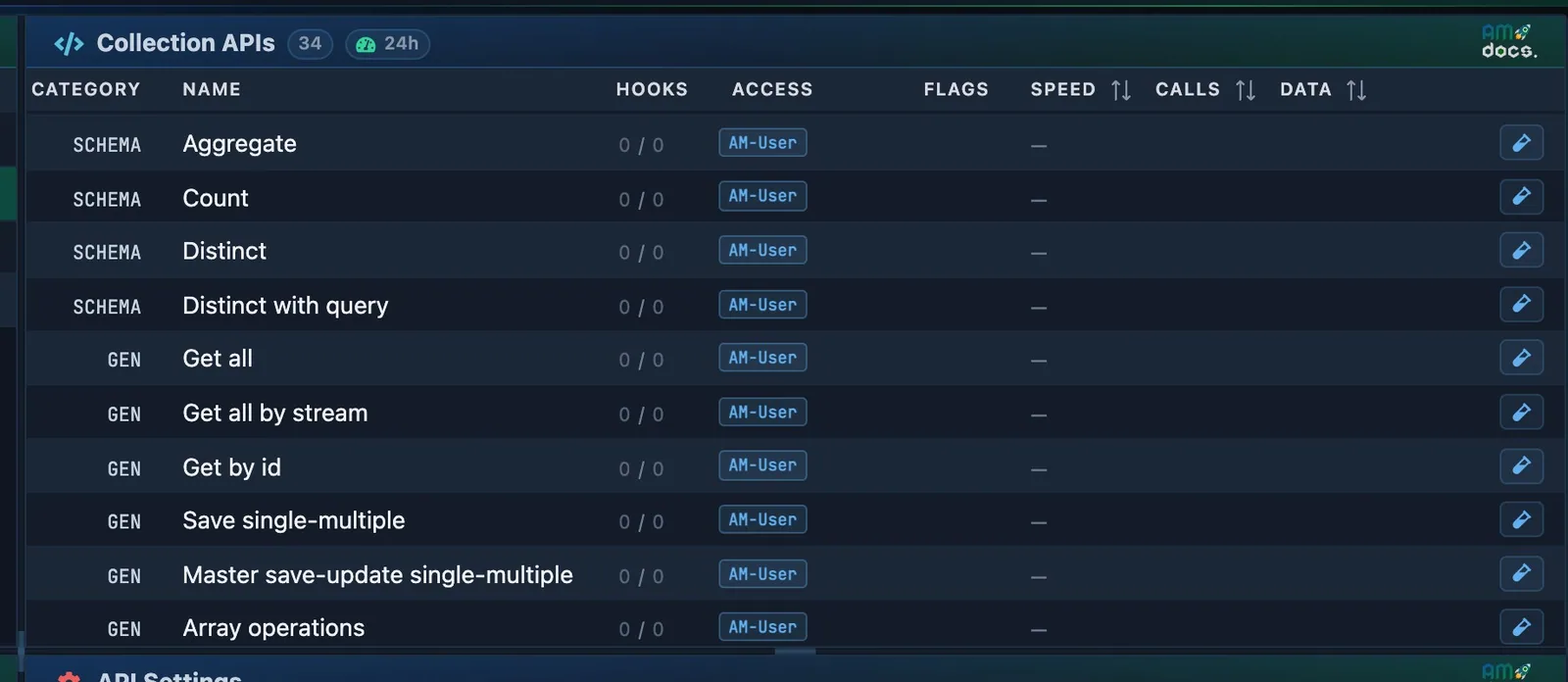
- How many APIs the table has.
- Each API of the table : its method and its URL. Test opens it in API Testing.
The URL of a table
| Segment | Meaning |
|---|---|
/api/schema or /api/gen |
The family : schema APIs apply the schema of the table, generated APIs are schemaless. |
user-path |
The API path of the admin or developer account which owns the instance (admin for the first admin). It is shown on the profile of the account. |
instance |
The name of the instance (the database server) in API Maker. For a tenant of a multi-tenant instance : instance::tenant. |
database |
The database on that server. |
table |
The table or collection. |
Generated (/api/gen) or schema (/api/schema) ?
Both families offer the same operations on the same URL pattern. The schema APIs read the schema of the table : values are converted to their types, validated, encrypted, defaulted and numbered before they reach the database. The generated APIs are schemaless : they pass your data as it is, so a number sent as "22" stays a string. Use the schema APIs for the tables your application writes to, and the generated APIs for quick reads and for tables without a schema.
Instances, databases and tables
APIs & Logic → Instance API (DB API) has four columns, left to right : instances, databases, tables, APIs. Pick one in each, and the next column fills.
- Instance : one database server that API Maker connects to. MongoDB, MySQL (also TiDB and Percona), MariaDB, SQL Server, PostgreSQL or Oracle. Its connection string stays in the secret.
- Database and table : what that connection sees, with their settings and schemas.
- API : one of the operations below, with its settings and a Test API button.
The name of an instance is part of every URL of its APIs. You can rename it, but then every one of those URLs changes.
Each button of these columns is explained on the table designer page.
The 17 operations of a table
A MongoDB collection has all 17. A table of an SQL database has 14.
Each path below comes after /api/schema/<user-path>/<instance>/<database>/<table>, or the same under /api/gen. [/:primaryKey] is optional : it names the column to find the id in, when it is not the primary key.
| Operation | Method and path | Body | Page |
|---|---|---|---|
| Get all | GET / |
query params | Get all |
| Get all by stream | GET /stream |
query params | Get all by stream |
| Get by id | GET /get-by-id/:id[/:primaryKey] |
Get by id | |
| Save single or multiple | POST /save-single-or-multiple |
one object or an array ; ?returnData=false |
Save single or multiple |
| Master save | POST /master-save |
objects with nested related objects ; ?returnData=false |
Master save |
| Update by id | PUT /update-by-id/:id[/:primaryKey] |
the fields to change | Update by id |
| Update many | PUT /update-many |
{ find, updateData, returnData? } |
Update many |
| Replace by id MongoDB | PUT /replace-by-id/:id[/:primaryKey] |
the whole document | Replace by id |
| Array operations MongoDB | PUT /array-operations |
{ find, operations } |
Array operations |
| Remove by id | DELETE /:id[/:primaryKey] |
Remove by id | |
| Remove by query | POST /query/delete |
{ find, returnData? } |
Remove by query |
| Query for get data | POST /query |
{ find, select, sort, skip, limit, deep, getTotalCount } |
Query for get data |
| Query for get data by stream | POST /query-stream |
same as query | Query for get data by stream |
| Aggregate MongoDB | POST /aggregate |
a pipeline array | Aggregate |
| Count | POST /count |
{ find } |
Count |
| Distinct | GET /distinct/:field[/:order] |
Distinct | |
| Distinct with query | POST /distinct/:field[/:order] |
{ find } |
Distinct with query |
- Replace by id, array operations and aggregate are for MongoDB only. On an SQL table they answer
400:This API is only supported for mongodb.(replace by id saysReplace by id API is not supported for instance type 'MYSQL_DB'.). - A schema API needs a schema. On a table without one, it answers
400:Schema is not defined for this collection 'products'. You can define schema or please try /api/gen version of the api.The generated APIs work on every table. - Each operation has an id :
SCHEMA_GET_ALL,GEN_POST_BULK_INSERT… Settings, groups, hooks and WebSocket events use it. See API ids.
What a write answers : returnData
A write that touches many rows answers a count by default. It reads the rows back only when you ask for them.
| API | Answer by default | With returnData |
|---|---|---|
| Save single or multiple, master save | the saved rows | ?returnData=false : { savedRowsCount }, and the rows are not read back |
| Update many | { updatedRowsCount } |
"returnData": true in the body : updatedRows too, as they are after the update |
| Remove by query | { deletedRowsCount } |
"returnData": true in the body : deletedRows and ids too, read before they go |
From code, returnData is a key of the g.sys.db call in every language : return_data in Python and Rust, ReturnData in C# and Go.
Shared by every read
| Query params | find, skip, limit, sort, select, deep, getTotalCount, and any column name as a filter. In the body for the query APIs. |
| Request headers | Tokens, x-am-response-case, x-am-content-type-response, x-am-response-object-type, x-am-cache-control, x-am-get-encrypted-data, x-am-internationalization, x-am-tenant-username… |
| Response format | { success, statusCode, data, totalCount, errors, warnings, logs, meta } |
Your own APIs
| Family | Method and path | Page |
|---|---|---|
| Custom API | GET POST PUT DELETE /api/custom-api/<user-path>/<path> : the method and path you give it |
Custom APIs |
| Pre and post hooks | Your code that runs before or after an API. | Pre hook · Post hook |
| Events | Your code that runs after a successful call of the APIs you pick, or when code emits the event. | Events |
| WebSocket events | Messages pushed to the clients that subscribed. | WebSocket events |
| Schedulers | Your code that runs at intervals or on a cron. | Schedulers |
| Utility classes | Code shared by all of the above : import * as Tax from 'utils/Tax'. |
Utility classes |
System APIs
Ready-made tools : 23 APIs under /api/system-api/<user-path>/…. All are POST. Your code calls the same tools through g.sys.system and g.sys.cache.
| Group | APIs |
|---|---|
| Security | /token · /encrypt-data · /decrypt-data · /hash-data · /get-secret-by-name |
| Redis and cache | /get-redis-key · /set-redis-key · /remove-redis-key · /reset-redis-cache-db · /reset-redis-cache-custom-apis · /reset-redis-cache-system-apis |
| Databases | /get-table-meta · /create-indexes · /drop-indexes · /get-indexes · /multi-tenant-instance-updated · /execute-plain-query · executeQuery from code |
| Events | /emit-event · /emit-event-ws |
| Validation | /is-valid-data-for-table · /is-valid-data-for-custom-api · /is-valid-connection-string |
| Outside | /call-external-api |
From your code
Every API above is a method of the global object g : g.sys.db.getAll, g.sys.db.gen.queryGen, g.sys.system.encrypt, g.sys.cache.setKey… with the same headers and query params, and an example for each one.
API ids
The ids used in groups, settings, hooks, events and WebSocket subscriptions.
Schema APIs
- SCHEMA_GET_ALL
- SCHEMA_GET_ALL_STREAM
- SCHEMA_GET_BY_ID
- SCHEMA_POST_BULK_INSERT
- SCHEMA_MASTER_SAVE
- SCHEMA_ARRAY_OPERATIONS
- SCHEMA_UPDATE_MANY
- SCHEMA_PUT_UPDATE_BY_ID
- SCHEMA_PUT_REPLACE_BY_ID
- SCHEMA_DEL_DELETE_BY_ID
- SCHEMA_POST_QUERY
- SCHEMA_POST_QUERY_STREAM
- SCHEMA_POST_QUERY_DELETE
- SCHEMA_POST_AGGREGATE
- SCHEMA_POST_COUNT
- SCHEMA_GET_DISTINCT
- SCHEMA_POST_DISTINCT_QUERY
Generated APIs
- GEN_GET_ALL
- GEN_GET_ALL_STREAM
- GEN_GET_BY_ID
- GEN_POST_BULK_INSERT
- GEN_MASTER_SAVE
- GEN_ARRAY_OPERATIONS
- GEN_UPDATE_MANY
- GEN_PUT_UPDATE_BY_ID
- GEN_PUT_REPLACE_BY_ID
- GEN_DEL_DELETE_BY_ID
- GEN_POST_QUERY
- GEN_POST_QUERY_STREAM
- GEN_POST_QUERY_DELETE
- GEN_POST_AGGREGATE
- GEN_POST_COUNT
- GEN_GET_DISTINCT
- GEN_POST_DISTINCT_QUERY
System APIs
- EXECUTE_PLAIN_QUERY
- ENCRYPT_DATA
- DECRYPT_DATA
- HASH_DATA
- GET_TOKEN
- CALL_EXTERNAL_API
- GET_SECRET
- GET_REDIS_KEY
- SET_REDIS_KEY
- REMOVE_REDIS_KEY
- RESET_REDIS_CACHE_DB
- RESET_REDIS_CACHE_CUSTOM_APIS
- RESET_REDIS_CACHE_SYSTEM_APIS
- GET_TABLE_META
- CREATE_INDEXES
- DROP_INDEXES
- GET_INDEXES
- EMIT_EVENT
- EMIT_EVENT_WS
- IS_VALID_DATA_FOR_TABLE
- IS_VALID_DATA_FOR_CUSTOM_API
- MULTI_TENANT_INSTANCE_UPDATED
- IS_VALID_CONNECTION_STRING